WELCOME TO PNG INSIGHT

Nambawan Super Savings and Loans Login Online Portal Login Info

Nambawan Super Savings and Loans provides a range of financial services to its customers. Its online portal is a convenient and secure platform that allows customers to access their accounts and a variety of financial services from anywhere in the world. By logging in, customers can access services such as account information, bill payments, loan applications, updating personal details, and secure messaging.

The benefits of using the online portal include easy access to account information, convenient bill payments, loan applications, and secure transactions. Customers should keep their login details secure, keep their contact details up to date, use the secure messaging feature to contact customer service, review their accounts regularly, and keep track of loan payments to avoid late payment fees.

In this article, we will take a closer look at how to login to the Nambawan Super online portal and what services you can access once you are logged in.

How to Nambawan Super Savings and Loans Login Online Portal Login Info


Nambawan Super Savings and Loans Login

The Nambawan Super online portal is a convenient and secure platform that allows customers to access their accounts from anywhere in the world. Some of the benefits of using the online portal include:

  • Easy access to account information: With the online portal, customers can access their account information, including their account balance and transaction history, at any time.
  • Convenient bill payments: Customers can pay their bills, such as water and electricity bills, directly from their Nambawan Super account.
  • Loan applications: Customers can apply for loans online without having to visit a physical branch.
  • Secure transactions: The online portal is secure, and all transactions are encrypted to protect customers' sensitive information.


How to login to the Nambawan Super online portal

To access the Nambawan Super online portal, you need to follow these simple steps:

  • Step 1: Visit the Nambawan Super website: The first step is to visit the Nambawan Super website at www.nambawansuper.com.pg. Once you are on the website, click on the "Login" button located at the top right corner of the page.

  • Step 2: Enter your user ID and password: On the login page, enter your user ID and password. If you are logging in for the first time, you will need to register for an account. To do this, click on the "Register" button and follow the prompts.

  • Step 3: Click on the "Login" button: Once you have entered your user ID and password, click on the "Login" button to access your account.

Here is who to check Nambawan Super Balance
Nambawan Super Online Balance Check


What services can you access once you are logged in?

Once you are logged in to the Nambawan Super online portal, you can access a wide range of services, including:

  • Account information: You can view your account balance, transaction history, and other account details.
  • Bill payments: You can pay your bills, including water and electricity bills, directly from your Nambawan Super account.
  • Loan applications: You can apply for loans online without having to visit a physical branch.

  • Update personal details: You can update your personal information, including your contact details and address.

  • Secure messaging: You can send secure messages to the Nambawan Super customer service team.

  • Access to statements: You can view and download your account statements.


Tips for using the Nambawan Super online portal

Here are some tips to help you get the most out of your Nambawan Super online portal experience:

  • Keep your login details secure: Always keep your user ID and password secure and do not share them with anyone.

  • Keep your contact details up to date: Ensure that your contact details are up to date, including your phone number and email address, so that you can receive important notifications from Nambawan Super.

  • Use the secure messaging feature: If you have any questions or concerns, use the secure messaging feature to contact Nambawan Super's customer service team. This ensures that your communication is secure and confidential.

  • Review your account regularly: It is important to review your account regularly to ensure that there are no unauthorized transactions or errors.

  • Keep track of your loan payments: If you have a loan with Nambawan Super, make sure to keep track of your loan payments and pay them on time to avoid late payment fees.


Nambawan Super Savings and Loans Login Online Portal Best Practices

The Nambawan Super online portal is a convenient and secure platform that allows customers to access their accounts and a range of financial services from anywhere in the world. 

Logging in is easy, and once you are logged in, you can access a wide range of services, including account information, bill payments, loan applications, and secure messaging. 

By following the tips outlined in this article, you can get the most out of your Nambawan Super online portal experience and ensure that your financial transactions are secure and hassle-free.

Asian Development Bank Funds TVET Schools in PNG

The Asian Development Bank (ADB) is providing K174 million worth of support to improve the Technical, Vocational Education and Training (TVET) sub-sector in Papua New Guinea.

Department of Higher Education, Research, Science and Technology (DHERST) Secretary Dr Francis Hualupmomi told The National that 10 out of the 22 TVET institutes recognised by the department would be benefiting from the total of K233 million TVET for an employment project.

“After we sign today (yesterday), funding will be released as soon as the accounts are open next year after March,” he said.

He pointed out that DHERST would be the implementing agency of the funding, with the PNG Government putting up US$6.3 million (K21 million), the Australian Department of Foreign Affairs and Trade US10 million (K34 million) and a concessional loan of US$50 million (K174 million) from ADB.

The 10 colleges earmarked to benefit from the project are:

  1. Port Moresby Technical College, 
  2. Bougainville Technical College, 
  3. Madang Technical College, 
  4. Mt Hagen Technical College, 
  5. Highlands Agricultural College, 
  6. Goroka Technical College, 
  7. PNG National Polytechnic Institute, 
  8. West New Britain Technical College, 
  9. Western Province Technical College and
  10.  Don Bosco Simbu Technical College.

“They were selected through the external market assessment conducted by ADB. They did their own assessment and then selected those 10 colleges and they will eventually become polytechnic institutions,” Hualupmomi said.

The specific focus of the project will be on investing in the upskilling of construction and agriculture skills.

This was in line with the government’s priority goals of the Medium Term Development Plans IV to ensure that all school leavers were educated and trained under the ‘No Child Left Behind’ policy.

SourceNational Newspaper 15/12/2022

This article appeared in the National Newspaper. It is a topic we have been following. We parked it here so that our visitors can read it here. 

How To Check Grade 7 Results 2024 Zambia

You can easily get the answers to the questions about how to check Grade 7 results on Airtel, how to check Grade 7 results online, and what the 2024 Grade 7 cut-off points from this article.

Here you'll find out about:

  • How To Check Grade 7 Results Zamtel, Airtel MTN - 8383.
  • How to Check Grade 7 Results Online?
  • Zambia Grade 7 results Stats
  • Grade 7 cut-off points for Zambia

PNG Insight has the latest information on this help page for our visitors from the beautiful country of Zambia. Click on the blue link for info you need to know about this year's Grade 7 and Grade  ECZ results.

How To Check Grade 7 Results 2023 Zambia


How To Check Grade 7 Results Zamtel, Airtel MTN - 8383.

  1. You open the new message pad on your Mobile Phone
  2. Type the full Examination Number (Leave Space)
  3. Type the Examination Year (Leave Space)
  4. Type the Examination Grade and
  5. Send to 8383

The checking of results is available to all networks with a service charge.

How to Check Grade 7 Results Online?

Here is how to check results for Grade 7 results online:

ECZ e-Statement of Results 2023 Zambia All You Need To Know

  • 5) Enter Examination Number
  • 6) Hit the Continue tab
  • 7) Click on “ELECTRONIC STATEMENT OF RESULTS” to view, download and print the PDF file.

That's how to check the Grade 7 - you can use the same steps to check the Grade 9, Grade 12 and GCE results.


Zambia Grade 7 results Stats

Here are the numbers released by ECZ for the candidates sitting the Year 7 2022 examinations:

  • Candidates entered - 493,932
  • An increase of 7.86% from 2021.
  • 255,828 candidates were Girls, 51.79% of the total number of candidates.
  • 238,104 candidates were Boys, 48.21% of the total number of candidates.
  • 44,405 (8.99%) candidates were absent.

91.01% of candidates sat Grade 7 examinations 

A promising 449,538 (91.01%) candidates sat for the ECZ Grade 7 examinations in 2024. This comprises of:

  • 233,189 Girls
  • 216, 349 Boys
Divisions compositions are as follows:

  • Division one - 64,008
  • Division two - 121,490
  • Division three - 96,356
  • Division four - 167,684

Grade 7 cut-off points for Zambia

More girls progressed through Divisions 1,2 and 3. While more boys than girls progressed through Division 4.

The progression rate is 100% due to automatic progression to Grade 8. 

 It is important to note that starting 2024, a passing mark (Grade 7 cut-off point) will be introduced.

Visit this page for more information on Grade 9 and Grade 12 results.

Disclaimer: This data and information are sourced from the Examinations Council of Zambia website, Facebook page and Twitter account. If you have any questions, please comment below. 

ITI PNG Selection List, Courses and Fees 2024 - International Training Institute

The International Training Institute (ITI PNG) is a private training provider for Grade 12 school leavers and working-class people. ITI opened its first campus in Lae in 2004, today ITI PNG has 10 campuses (and 1 distance learning centre). 

It provides entry (certificate and diploma) courses in IT, Human Resource Management and accounting. 

ITI Diploma Programs are accredited by DHERST.

ITI PNG Courses and Fees 2024

Check out the ITI Non-School Leavers (NSL) and School Leavers Information here.

International Training Institute (ITI PNG) Courses and Fees 2024

ITI PNG website has the latest details on its entry certificate courses which are partway to ITI diploma courses. 

PNG Insight picks out the courses that are fitting for Grade 12 non-school leavers. 

Read on to find out about the PNG ITI courses and fees for 2024.

Certificate entry courses for Grade 10 Non-school Leavers

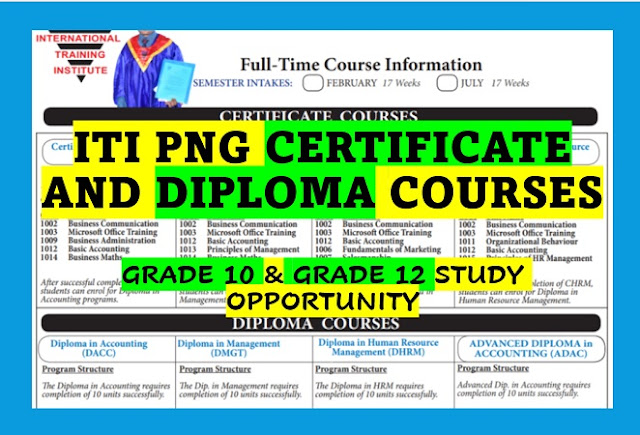
The Grade 10 non-school leavers entry courses are full-time courses. The courses have a duration of 17 weeks. ITI PNG takes in students twice a year - February and July.

There are five courses, and each requires students to complete five units. 

According to ITI PNG, its course fee 2024 for the certificate courses is K3,400 (K1,200 on registration, followed by approved installments.)


ITI Certificate courses 

After completing the entry Certificate courses, students can enrol on the Diploma programs. Here are the 5 ITI PNG entry courses for Grade 10 non-school leavers:

  • Certificate in Accounting
  • Certificate in Business
  • Certificate in Sales
  • Certificate in Computing
  • Certificate in Human Resource Management

As mentioned, all the certificate courses fee is K3,400. You must pay K1,200 on registration, followed by approved instalments. The Entry Requirements: You must have successfully completed Grade 10 with passes in English and Mathematics. The course duration is 17 weeks, starting twice a year, in February and July.

ITI Diploma Courses

ITI students completing the certificate course that meet the entry requirements can proceed to diploma courses. Also, ITI accepts Grade 12 school non-school leavers who can apply for diploma courses. 

Here are the courses for the non-school leavers for February and July intakes:
  • Diploma in Business Accounting
  • Diploma in Business Management
  • Diploma in Human Capital Management
  • Diploma in Marketing Management
  • Diploma in Information and Communication Technology
To apply for the diploma courses at ITI PNG, you must have a certificate or be a Grade 12 with a C or above in English and Maths. A grade D grade in Advanced Maths is eligible for a Diploma in Business programs and for a Diploma in ICT.

The duration of the Diploma Courses is 17 - 34 weeks.

International Training Institute (ITI PNG) Selection List 2024

ITI PNG releases the selection list of intakes before February and July every year. If you submit your application, check before the ITI academic year starts. 

You can also contact the ITI office for more information on application forms, acceptance lists and courses and fees for 2024.

Note that ITI PNG courses and fees are quoted at the time of this article. This may change. So, check the ITI website for the latest courses, fees and admission information you need before the academic year commences.

ITI Campus in PNG

ITI PNG has 10 campuses in the country that offer certificate and diploma courses to both Grade 10 and Grade 12 students. 

Here is the complete list of the International Training Institute (ITI) campuses. You can also find the contact details and know the campus close to you.

POST A COMMENT.

SEARCH THE ENTIRE SITE HERE

Public Holidays in PNG 2025

Public Holidays in PNG 2025
CLICK ON THE IMAGE TO GET THE LATEST INFORMATION