WELCOME TO PNG INSIGHT

How to Apply to Dauli Teachers College: School Leavers and Non-school Leavers

Dauli Teachers College, an agency institution affiliated with the Anglican Church, is renowned for individuals aspiring to become primary school teachers in Papua New Guinea. The college offers the following programs:

  • Diploma in Primary Teaching
  • Bachelor of Education (Primary) PRE-SERVICE, 
  • Bachelor of Education (Primary) IN-SERVICE, 
  • Bachelor of Education (Early Childhood Education), and 
  • Bachelor of Education (Special and Inclusive).

If you are considering applying to Dauli Teachers College, it's important to understand that the application process differs for Grade 12 school leavers and non-school leavers. To assist you, here is a step-by-step guide on how to apply to Dauli Teachers College as a Grade 12 School Leavers and non-school leavers in 2024 for 2025.

Here, you'll get information on the application form, contact details and GPA requirements.
Non-school Leavers Application Form 2024 PDF download


1. Grade 12 School Leavers

If you are a Grade 12 student interested in joining Dauli Teachers College, you must utilize the DHERST National Online Application System (NOAS). Here's what you need to do:

a. Initiate Communication: Speak with your school's deputy principal (Academic) to express your interest in studying at Dauli Teachers College. They will guide you and assist you in completing the online school leavers form.

b. Fill Out the Form: Log in to the DHERST NOAS portal and complete the application form. During the application process, make sure to select Dauli Teachers College as one of your five choices.

c. Submit Required Documents: Collect all the necessary documents, including your academic transcripts, certificates, and identification papers. These documents will be uploaded as part of your application.

d. Review and Submit: Double-check all the information provided in the application form to ensure its accuracy. Once you are satisfied, submit your application online through the NOAS portal.

For more information on GPA, click here

2. Non-School Leavers

If you are a non-school leaver interested in applying to Dauli Teachers College, the application procedure is slightly different. Here's what you need to do:

a. Contact the College: Get in touch with Dauli Teachers College to request an application form and additional information about the application process. You can contact the college using the following details:

  • Address: PO Box 16, Tari, Hela Province
  • Phone: (+675) 540 8079 or 540 8070
  • Mobile: (+675) 71215940 or 70032924
  • Email registrar: johnbakura20@gmail.com, wluviidtc@gmail.com or pkichawen@gmail.com

b. Obtain the Application Form: Once you have established contact, the college will provide you with the application form in either physical or digital format. Ensure that you collect all the necessary application materials.

c. Complete the Form: Accurately fill out the application form, providing all the required information. Attach any supporting documents, such as academic records, certificates, and identification, as specified in the application guidelines.

d. Submit Your Application: After completing the application form and gathering all the necessary documents, submit your application to Dauli Teachers College according to the provided instructions. Pay close attention to any mentioned deadlines and make sure your application reaches the college on time. You must hand-deliver or submit the application to the registrar as instructed in the application form.


Eligibility Criteria

To be eligible for admission to Dauli Teachers College, applicants must meet the following criteria:

1. Grade 12 School Leavers:

  • Successful completion of Grade 12 or it's equivalent.
  • Meeting the minimum GPA requirement specified by DHERST (Department of Higher Education, Research, Science, and Technology).
  • Fulfilment of prerequisite subjects specified for the chosen course.

2. Non-School Leavers:

  • Possession of Grade 12 or equivalent qualification.
  • Fulfilment of any additional requirements specified by the college for non-school leaver applicants.


Apply to Dauli Teachers College

It is important to note that meeting the eligibility criteria does not guarantee admission, as the selection process is competitive. Dauli Teachers College evaluates applications based on academic merit, supporting documents, and available spaces.

Embarking on a teaching career at Dauli Teachers College can be a significant step toward fulfilling your passion for educating young minds. By following the appropriate application procedures, you increase your chances of securing a place at this esteemed institution. Best of luck with your application to Dauli Teachers College!
NASFUND Online Portal: How to Get the Help You Need

NASFUND is Papua New Guinea's largest and most successful superannuation fund, providing secure retirement benefits for over 620,000 members. 

As part of its commitment to providing accessible and convenient services, NASFUND offers a user-friendly online portal for its members, which provides easy access to their account information and other services. 

In this article, we will guide you through the process of registering for and logging into the NASFUND Online Portal, and highlight the benefits of using this platform.

NASFUND Online Members Portal - how to login

Find out how to check you NASFUND balance using mobile phone, click here

How to Register for the NASFUND Member Portal

Before you can access the NASFUND Online Portal, you need to be a member of NASFUND. If you are not yet a member, you can join by completing an application form and submitting it to your employer or directly to NASFUND. Once you are a member, you can follow these steps to register for the NASFUND Online Portal:


Go to the NASFUND website at www.nasfund.com.pg

Click on the 'Member Login' button at the top right-hand corner of the page

Click on the 'Register' button on the login page

Enter your member number, date of birth, and email address

Create a username and password

Agree to the terms and conditions

Click 'Register' to complete the process

How to Login to the NASFUND Online Portal


Once you have registered for the NASFUND Online Portal, you can log in using the following steps:


Go to the NASFUND website at www.nasfund.com.pg

Click on the 'Member Login' button at the top right-hand corner of the page

Enter your username and password

Click 'Login' to access your account

If you forget your username or password, you can click on the 'Forgot Username' or 'Forgot Password' links on the login page and follow the prompts to reset your credentials.


Benefits of Using the NASFUND Members Online Portal

The NASFUND Online Portal provides a range of benefits for its members, including:

  • Access to account information: Members can view their account balances, transaction history, and other details at any time from anywhere.
  • Online transactions: Members can use the portal to update their personal information, nominate beneficiaries, and make online contributions.
  • Secure communication: Members can use the portal to send secure messages to NASFUND, which helps to protect their personal information.
  • Convenience: Members can access their account information and services at any time and from anywhere, making it easy to manage their superannuation.


Contact NASFUND Members Office

If you encounter any difficulties with registering for or logging into the NASFUND Online Portal, you can contact the NASFUND Members Office for assistance. You can reach them by phone at 1599 or by email at memberservices@nasfund.com.pg.


Conclusion

The NASFUND Online Portal is a convenient and secure platform for NASFUND members to manage their superannuation. By following the simple registration and login steps outlined in this article, members can easily access their account information and use a range of services online. With its user-friendly interface, secure communication features, and round-the-clock accessibility, the NASFUND Online Portal is an essential tool for managing your retirement savings.

Lutheran University Council Officially Sworn In Significant Milestone for PNG Education

The Lutheran University Council was officially sworn in today in Port Moresby, marking a significant milestone for the Evangelical Lutheran Church's vision of having its own university. 

The Lutheran University of PNG (LUPNG) was established in 2022 through the amalgamation of three Evangelical Lutheran institutions:

  • Balob Teachers College,
  • Lutheran School of Nursing, and 
  • Martin Luther Seminary.
After 30 years of vision and hard work, the interim Council was established in May 2022 and was awaiting the formal operation of the Lutheran University Act, which came into effect in September 2022.

This blog has been following this story since PNG prime minister James Marape promised the people of Morobe a Lutheran University in January 2020.

Here is the leading story about PNG's 8th university in the making, the Lutheran University of PNG.

The Lutheran University of Papua New Guinea


Council Appointment and Priorities

The formal Council was appointed by the Chancellor of LUPNG, Dr Eric Kwa, in November 2022. 

The Council comprises people from various sectors in the country, including representatives from Divine Word University, which has been a great friend of the Lutheran Church in setting up LUPNG. 

The membership is drawn from the Lutheran Church's membership and other denominations that can contribute meaningfully to the establishment of the Lutheran University.

Dr Kwa stated that the immediate priorities for the Council include the progressive work on merging the amalgamated higher learning institutions. 

Three different independent institutions were merged into one, and the Council has the task of working together with different interest groups to ensure that LUPNG is delivered as a single unit. 

The Council has been working closely with the Department of Higher Education, Research and Technology (DHERST), including Divine Word University, to ensure the successful establishment of LUPNG.


Challenges and Reassurance

Despite the challenges that may arise from previous boards, management, students, and staff, Dr Kwa reassured everyone that the Council is not here to disrupt operations but to work with them. 

He also thanked the Marape-Rosso government for recognising the Church's work in development and Lutheran Bishop Right Reverend Dr Jack Urame for his continued assistance.


Lutheran University Council Swearing-in

Obviously, the official swearing-in of the Lutheran University Council is a significant step towards achieving the Evangelical Lutheran Church's vision of having its own university. 

The Council's priority in merging the amalgamated institutions is crucial in ensuring the successful establishment of LUPNG.

All in all, the establishment of LUPNG will undoubtedly contribute significantly to the development of education in PNG and provide opportunities for students to achieve their educational and career goals.

How to use Digicel Cell Money to Pay for PNG Air Ticket

Are you a PNG Digicel user looking for a convenient way to pay for your PNG Air ticket? You can use Cell Money, a Digicel product that allows you to make payments directly from your mobile device.

But what exactly is Cell Money, and how can you use it to pay for your PNG Air ticket? Let's take a closer look.


PNG Digicel Cell Money

Cell Money is a mobile money service offered by Digicel that allows you to send and receive money, pay bills, and make purchases using your mobile phone. 

It's a safe and secure way to manage your money, without the need for cash or a physical bank account.


Use Cell Money to Pay for PNG Air Ticket

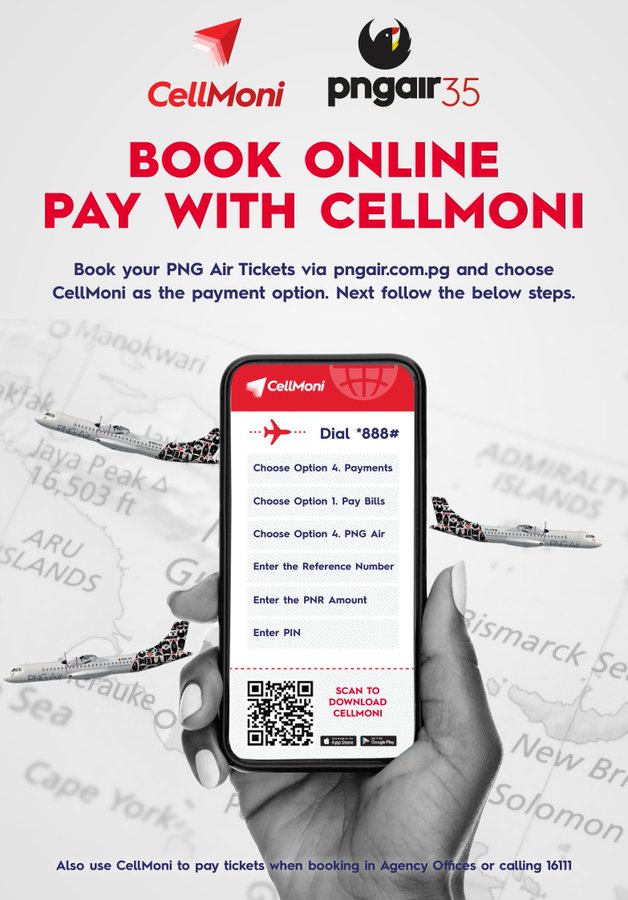
To use Cell Money to pay for your PNG Air ticket, first, visit the PNG Air website at https://pngair.com.pg/ to make your booking. 

During the checkout process, select Cell Money as your payment option. You will receive a confirmation email from PNG Air that includes a Cell Money reference number and the amount to pay within 24 hours.

Next, dial *888# on your mobile phone and select option 4 for bill pay. Then, select PNG Air and enter the Cell Money reference number provided in your confirmation email. 

You will receive a pop-up message asking you to confirm that all the information provided is correct. Once you've confirmed, enter your Cell Money pin to complete the payment.

Finally, you will receive an email from PNG Air with your ticket details. If you need any assistance during the process, you can call 888 for support.


PNG Air ticket made easy

Using Cell Money to pay for your PNG Air ticket is a quick, convenient, and secure option for Digicel users. And with the Cell Money product from Digicel, you can also earn rewards and discounts for using Cell Money to make payments.

So next time you need to book a flight on PNG Air, consider using Cell Money as your payment method for a hassle-free experience.


Also read about the best way to make PNG Air Online Booking, click here.

PNG air online booking

How to top up your Cell Money

To top up your Digicel mobile account using Cell Money, you need to follow these simple steps:

  • Dial *888# on your mobile phone and select the "Top Up" option.
  • Enter the mobile number that you want to top up.
  • Select the amount you want to top up.
  • Enter your Cell Money PIN to confirm the transaction.

You will receive a confirmation message once the top-up is successful.


How to top up friends and family Cell Money

If you want to top up someone else's Digicel mobile account using Cell Money, you can follow these steps:

  • Dial *888# on your mobile phone and select the "Top Up" option.
  • Enter the mobile number of the person you want to top up.
  • Enter the amount you want to top up.
  • Enter your Cell Money PIN to confirm the transaction.

The person you topped up with will receive a confirmation message.


How to register with Cell Money

It's important to note that to use Cell Money, you need to have a Digicel mobile account and have your mobile number registered with Cell Money. 

To register, simply dial *888# and follow the prompts.

Cell Money is a convenient and easy-to-use mobile money service that offers a range of benefits for users in Papua New Guinea. With the ability to send and receive money, pay bills, make purchases, and top up mobile credit.

In summary, if want to pay for your PNG Air ticket, Cell Money is a safe, convenient, and secure option for Digicel users in Papua New Guinea.

POST A COMMENT.

SEARCH THE ENTIRE SITE HERE

Public Holidays in PNG 2025

Public Holidays in PNG 2025
CLICK ON THE IMAGE TO GET THE LATEST INFORMATION