WELCOME TO PNG INSIGHT

2024 NOAS Application Eligible Programs During the Grade Period for Grade 12 School Leavers and Non-School Leavers

The DHERST National Online Application System (NOAS) simplifies the Grade 12 School Leavers and Non-school Leavers application process, ensuring students apply for eligible programs during the Grace Period. 

This innovative system clearly highlights ineligible options, reducing the risk of mistakes and enabling students to make informed decisions. Also, it allows students to select up to five choices, increasing their chances of acceptance into their desired tertiary institutions. 

This streamlines the selection process and helps Grade 12 students make informed decisions during the Grace Period.

CLICK HERE to know the latest dates and DHERST TESAS LIST PDF publication date.

NOAS Application Eligible Programs During the Grade Period

National Online Application  System (NOAS) 

The 2024 NOAS Application for Grade 12 School Leavers and Non-School Leavers provides a flexible and convenient approach. This new system offers more choices, allowing students to modify their selections as often as needed. 

Unlike the old system, which limited students to three choices with no option for changes, the updated NOAS system enables you to select up to five institutions. 

To make the most of this opportunity, research thoroughly and choose institutions that align with your goals. Regularly check the NOAS to see which institutions offer your desired courses. Seek advice from teachers, parents, guardians, and patrons to ensure your choices are well-informed and strategic. 

This approach enhances your chances of securing a spot in a tertiary institution and helps you make informed decisions about your future.

2024 Grace Period - Its Importance

The 2024 Grace Period, which commences on 2nd December 2024 and ends on 5th December 2024, is a critical window for Grade 12 students to refine their choices. During these four days, you have the opportunity to 'fine-tune' your selections, with DHERST providing insights on NOAS regarding your eligibility based on your examination results.

DHERST highlights the significance of the Grace Period as follows:

"This [Grace Period] is a crucial period where you will start making your choices based on your final grade 12 results. Ensure to access your account during the mentioned dates. If you see a red highlight in any of your five choices under 'My Choices', this means your final result has not met the minimum program requirement set by the institution. Therefore, you must change the red highlighted choice to a different program available in your list."

It is better to use the Grace Period to adjust your choices to more suitable ones. After the due date, DHERST does not permit any further changes. 

By mid-December, Grade 12 students will have received their exam results and be in a better position to adjust their selections in NOAS. 

Make sure to take full advantage of this period to ensure your choices are well-informed and aligned with your academic aspirations.
2024 DHERST NOAS Online Application Grade 12 https //apply.dherst.gov.pg login

Launching of 2024 Selection for 2025 Academic Year

The Department of Higher Education, Research, Science, and Technology (DHERST) will officially launch the 2024 selection lists for universities and non-universities on 16th December 2024. Utilising the National Online Selections System (NOSS), the online selection process will be executed efficiently within just 35 seconds.

Here's what the higher education secretary has to say about this innovative national online selection system. Make sure to watch the video, and don’t forget to like, comment, and subscribe to PNG Insight for insightful content on education and development in Papua New Guinea.


About the National Online Application System (NOAS LOGIN)

NOAS remains the property of the National Government of Papua New Guinea and is administered by the Department of Higher Education, Research, Science and Technology. 

NOAS facilitates national admissions and selections into higher education institutions in PNG. This portal facilitates Grade 12 school-leaver applications. In 2024, non-school leavers will also use the NOAS to apply to universities and colleges.

Non-school leaver applicants

Non-school leaver applicants must contact directly the institute of their choice and follow non-school leaver application requirements.

Contact DHERST

For further information, please contact the DHERST Support Service noassupport@dherst.gov.pg

Source: DHERST


References articles and Insights

Related articles to help you understand the process from application to selection and launching and publication of DHERST acceptance list for PNG Universities and colleges.

MyNSFAS Students Portal Login 2025 Account Status

In this article, you'll learn how to use the NSFAS students portal; what to do when you have problems logging in; and how to apply and check the fund application status. The headlines will help you as you are using the portal and get help.

MyNSFAS Students Portal 2026
MYNSFAS LOGIN

MyNSFAS Students Portal 2025/2026

The NSFAS (National Student Financial Aid Scheme) is the South African government's financial assistance scheme for students who completed high school and entered universities and colleges in the country. 

A student who is financially disadvantaged (or cannot afford to pay tertiary institution fees) can apply for the South African National Student Financial Aid, through the NSFAS Students Portal.

The 'gateway' to securing a scholarship 2025

Since 2017, MyNSFAS Students Portal has been the 'gateway' to securing a scholarship grant for many students in South Africa. 2025/2026 MyNSFAS will be the 6th year running. And the present Grade 12 students who are selected to a university or college can apply for a 2025 grant using the portal. 

Read on to find out how to create an account, apply for a grant for 2025 and check your application status. 

How to create a new MyNSFAS portal account

The online portal will enable new students to create an account. Visit and access the NSFAS using either your cellphone or computer and go to the portal at https://my.nsfas.org.za. 

If you already have a MyNSFAS account, you can already access this portal. See below for more information. 

How to login to MyNSFAS account

The registered students can access their MyNSFAS account by following these steps:

  • Go to www.nsfas.org.za
  • Click on MyNSFAS Account.
  • Input your username and password.
  • Login to MyNSFAS account.

MyNSFAS account status check 

At this stage, you should have had your login details (account name and password) to access the MyNSFAS student portal. Follow the steps given to check your account status - notes on the progress of your grant application status are indicated.

  • Step 1: Visit the myNSFAS student portal
  • Step 2: Enter Your Email and Password in the field provided,
  • Step 3: Click on the Sign-in button to access your application status.

Verification of documents and account status

The verification of documents and account status can take a while because there are several bodies involved in the checking. But, it should be complete before the new academic year starts. Here are the meanings of the NSFAS application status:

  • Application Submitted: Your application has been loaded onto the system successfully.
  • Filtering: The system checks if you are a returning student and whether you have any previous qualifications.
  • Validation: conducting third party checks with SASSA and the Department of Home Affairs.
  • Evaluation: verifying all the documents you have submitted during your application.
  • Funding Eligibility: verifying your household financial status that was declared in your application.
  • Awaiting Academic Results/Admission: checking your academic results and your institution admission status to ensure that you meet the requirements to be funded by NSFAS.
  • Awaiting Registration: receiving data from your institution to enable them to create a bursary agreement.
  • Signing Of Agreement: At this stage, you need to sign your bursary agreement so that NSFAS can disburse your allowances.
  • Payments: Your allowances are now being paid either through the NSFAS mobile wallet system or through your institution.

Forgotten Password

If for some reasons or other, you can’t log in to MyNSFAS due to Forgotten Password you do not need to worry. Follow the below steps to reset the login details:

  • STEP 1 – Go to www.nsfas.org.za, click on ‘myNSFAS’ and then select ‘forgot password.
  • STEP 2 – Type in your ID number and choose what you require help with: password or username or both, then click ‘submit’.
  • STEP 3 – The username and the link to change your password will be sent via SMS and email.
  • STEP 4 – Open the link to be redirected to the reset password page.
  • STEP 5 – Reset your password by following the prompts on your screen.

MyNSFAS Status Provisionally Funded - what to do

If your grant status is *Provisionally Funded, you should get in touch with your university or college (or Admin Staff) immediately and ask for clarity. They will be able to help you. 

Here are two reliable online platforms where you can get help for the National Student Financial Aid Scheme
  • NSFS Facebook Page.
  • South African Government website.

 MyNSFAS locked wallet - a serious problem

Many users of the MyNSFAS portal have raised concerns that their accounts are locked for some unknown reasons. The technical staff are attending to them but at a slow pace. Try this out, it might help,
accessing your NSFAS Wallet

Use your phone to unlock your NSFAS Wallet
unlock NSFAS Wallet using phone


If you are, still, experiencing this problem (locked wallet), here are 5 suggestions to help you; 
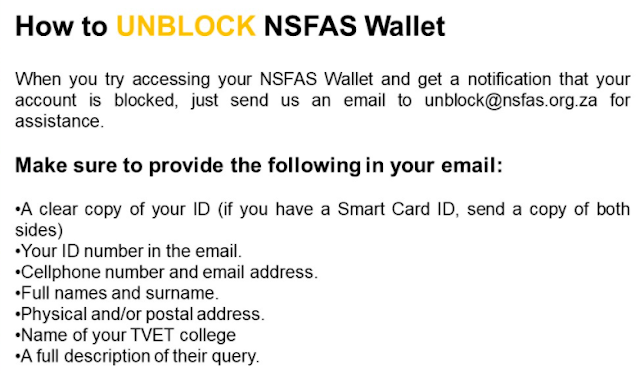
  • Send us an email to unblock@nsfas.org.za for assistance.
  • Call, email/message via Facebook page.
  • Ask your university or college Admin Staff to help you.
  • If you are in Cape Town, visit 2nd Floor, House Vincent, 10 Brodie Road, Wynberg, Cape Town, 7800
  • Email/Call the Head Office Staff - their contact details are here.
Hope this article helps you when you are using the MyNSFAS Student Portal.

Cambridge International A Level results 2022

Cambridge IGCSE, O Level and International AS & A Level result day is the 12th of August at 06:00 (BST) (05:00 UTC/GMT). 

Schools can issue these results to candidates immediately. Visit the result webpage.

Cambridge igcse results 2022

Cambridge Pre-U result dates

Cambridge Pre-U results will be released to schools on Wednesday 18 August at 00.01 BST (23.01 UTC/GMT Tuesday 17 August). 

These results can be issued to candidates at 08.00 BST (07.00 UTC/GMT) on Thursday 19 August.

For further information about the release of results, you can visit our website.

If you are a student and have any questions about the release of results please refer these to the exams officer at the school or centre where you have taken your exams.

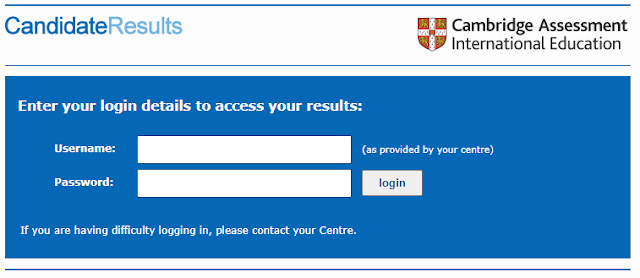
Candidate 2022 Results Login Help

Login details for the Candidate Results website are issued by Cambridge International schools. 

If you need login details or have lost them, please contact the exams officer at your school or centre where you have taken your exams.

Grade 12 Selection List For 2026 PDF: DHERST HECAS STUDENTS ON GOVT SCHOLARSHIP

The DHERST Selection List for all universities and tertiary institutions will be made available online as a PDF after the launcing on the 17th of December, 2025. DHERST requires a few days to finalise the online selections for each tertiary institution before publishing it. The expected release date is the 23rd of December, 2025.

The final DHERST list will be published online in PDF format. The Department of Higher Education has released the schedule. Click here to find out when the Grade 12 Selection List PDF will be available.


DHERST TESAS LIST 2024/2024

NDOE 2025 Grade 12 Exam Result vs DHERST NOAS 2026 Selection List

Grade 12 Exam Results Release Date: The National Department of Education (NDOE), through the Measurement Services Division (MSD), has not yet communicated the online release date for the Grade 12 students' exam results. Historically, these results are typically released in early to mid-December. By this time, all Grade 12 students in the country should have accessed their examination results and seen their selection status on the National Online Application Systems (NOAS).

DHERST NOAS 2026 Selection Launch: The Department of Higher Education, Research, Science and Technology (DHERST) has announced that the launch of the Grade 12 selection for 2026 will take place on December 17th, 2025. Understandably, the exam results will be available before this launch date, allowing students to review their results and selection status.

Here is how the online results and selection work

When will Grade 12 Selection List For 2025 List be Published?

Here are the key dates for 2025/2026

- Grace Period Ends: Sunday 14th December

- Launching of 2025 Selection for 2026 Academic Year: Wednesday 17 December

- Publishing of TESAS Award List 2026: 23rd December, 2025

Grade 12 Selection List For 2026 PDF - HEIs

PNG Universities and Colleges 2026 Acceptance, TESAS, HELP Loan and Registration and Orientation - ALL YOU NEED TO KNOW.

We also provide some background information about the 6 PNG universities here. Find out about the selection lists for UPNG, UOG, UNRE, Unitech, DWU and PAU:

How to Confirm Grade 12 Students' Selection and TESAS Status

The Grade 12 selection is done online and is quick. The final list of admitted students for the 2026 academic year will be published online.

Applicants are advised to keep an eye on the DHERST website or social media pages for updates regarding the selection process.

Here is how to check the selection status (WITH VIDEO GUIDE). This article shows you how to use the Grade 12 student SLF number and search the downloaded PDF files, with ease :) So, check it out. 

PNG Insight will continue providing updates on the Grade 12 Selection List. For inquiries regarding the Grade 12 Selection List For 2026 PDF, please leave a comment below or refer to the latest update here.

_____

About PNG Insight

PNG Insight is an education blog. It aims to highlight the key developments in the education sector in Papua New Guinea. Started in 2014 on Google's blogger (now self-hosted on WordPress), PNG Insight strives to be a platform for critical thinking and discussions; and a source of information.

We ask that you join us on FacebookTwitter or YouTube for up-to-date education info on tertiary institution selections in the country, as they happen. 


----ARCHIVE----

DHERST Selection & TESAS Award List | PNG Universities


NOTE: This is an update that we brought to our readers last year - we will bring the same update on the 2026 Grade 12 selections list for universities and non-universities. Visit the links above for the latest information for this year.

  • #5 The Grade 12 (NEW INTAKES) Selection List is now published by DHERST - See the 'stats that matter 
  • #4 Notes on 2021 Continuing Students TESAS Awards List, why many students' names are not on the list published by DHERST.
  • #3 For the status updates of PNG universities' acceptance list, click here.
  • #2 DHERST has not released the 2021 School Leavers TESAS award list for HEIs. It is not clear why, but we believe the HEIs sent the Students' Acceptance Letters out already.
  • #1 As predicted in an earlier video (at the end of this article), DHERST has announced that the Tertiary Selection List will be released on Friday the 8th of January.

Get My Exam Results 2025: How to Login to MyPNGExamResults Portal Using Default Password

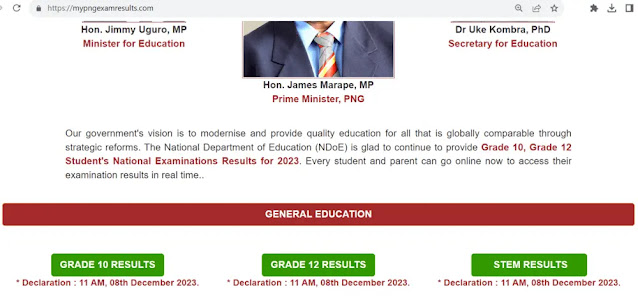
The exam results for Grade 10 and Grade 12 are normally released early in December every year. To access your Grade 10 and Grade 12 Exam Results for 2025, simply visit the MyPNGExamResults portal at mypngexamresults.com and follow the instructions on how to log in.

But how do you actually login to MyPNGExamResults Portal? The guide below will show you how to login to 'MyPNGExamResults portal' using the default password. Check out the steps and example to help you access your exam results online.


mypngexamresult.com 2024 exam results login

How to Login Exam Results Portal Using Default Password?

The Grade 10 and Grade 12 Students in the country can now access their results online, anywhere in PNG where there are internet and mobile phone networks. Here is how to check My Exam Results 2025.

The Students will use their 'default password' to log in and access the Grade 10 Exam Result. The default password format is yyyyprschcand
  • yyyy is year E.g. 2025
  • pr is province code E.g. 36
  • sch is school code E.g. 123
  • cand is candidate number E.g. 1001 
To access your Grade 10 and Grade 12 Exam Results for 2025, simply visit the MyPNGExamResults website at mypngexamresults.com and follow the instructions on how to log in.

What to do to access your PNG Exam results

For example, the Grade 10 student Kila KOBLE password will be 2025361231001. So, the
  • Surname is Koble
  • Given name is Kila
  • Password is 2025361231001
This video briefly explains the format of the default password and how to enter the characters correctly.


My PNG Exam Results 2025 Portal

Grade 10 and Grade 12 students will need a smartphone or computer. And mobile data to connect to the internet to view the exam results online. 

The website is called MyPNGExamResults. You can access it via the URL https://www.mypngexamresults.com 2025.

Default password does not work. Help!

Your default password will work if you follow the instruction thoroughly. In a case where your password does not work there are 5 things you must do in order:
  • Check with your school that the default password (yyyyprschcand) is correct, especially the candidate number.
  • 'Clear input data' and try again.
  • Clear the Cache on your mobile phone or computer and try again
  • Ask your school to assist you by checking the log in detail, again.
  • Only seek assistance from MSD as the last resort, and must be done through your school or Exam Coordinators (also called PES) in the provinces.
Important: If you change your password, it is your responsibility to set it so that ONLY you can remember it. Do not give an excuse that you 'forgot' the password. It is all up to you to ensure that you recall the password every time you need it! 

Resources and article on My PNG Exam Results 2025 for Grade 10 and Grade 12

The video and this article should help you to see your online results without any problem. But if you still have other difficulties, you may find help here. 

  • Check out the dates for this year, here.
  • You may also find our article on Grade 10 Online results here helpful. 
  • We followed the developments in education over the years and have a collection of educational Apps and websites. Click here to check them out.

If you have any questions about the My Exam Results 2025, please leave a comment below.

About PNG Insight

PNG Insight is an education blog. It aims to highlight the key developments in the education sector in Papua New Guinea. Started in 2014 on Google's blogger (now self-hosted on WordPress), PNG Insight strives to be a platform for critical thinking and discussions; and a source of information.

Leave a comment and let us know about your visit. 

DHL Tracking PNG: How to Track Your Shipment

DHL PNG is the largest logistics company in Papua New Guinea, providing courier, express, and parcel delivery services for both individuals and businesses. If you have sent or received a parcel through DHL PNG, you may want to track its progress to ensure it arrives at its destination on time. 

Here's how to use the DHL tracking PNG number to track your shipment.


Step 1: Obtain your DHL tracking PNG number

Your DHL tracking PNG number is a unique identification number that allows you to track your shipment. 

You can obtain this number from the shipper or online shop that sent the parcel. The tracking number may be provided in the confirmation email or shipment tracking notification.


Step 2: Enter the DHL tracking PNG number

Once you have your DHL tracking PNG number, go to the DHL website or app and enter the number in the tracking field. Make sure to enter the number correctly, including any letters or symbols.


Step 3: Check your shipment status

After entering your tracking number, you will see the status of your shipment. You can see:

  • when the shipment was picked up, 
  • when it arrived at DHL's facility, and 
  • when it was dispatched for delivery. 
You can also see the estimated delivery date and time.


Step 4: Resolve any tracking issues

If you encounter any issues with your tracking information, such as the tracking number not working, make sure you have entered the correct tracking number. If the issue persists, contact your shipper or online shop for assistance.

If you do not have your tracking number, contact your shipper to obtain it. If you have other shipping reference numbers, you can try using them to track your shipment through DHL's various business units.


Final words...

DHL PNG provides reliable and efficient delivery services for parcels and items. With the DHL tracking PNG number, you can track your shipment and ensure it arrives at its destination on time. 

Follow the simple steps outlined above to track your shipment and resolve any tracking issues that may arise.

dhl tracking PNG  number - dhl tracking png 2023

FAQs

Here are 7 frequently asked questions (FAQ) related to DHL tracking in PNG, along with their respective answers:


1. What is a DHL tracking PNG number?

A DHL tracking PNG number is a unique combination of numbers and letters that identifies your shipment for tracking purposes. It allows you to monitor the progress of your parcel as it moves through the DHL network.


2. Where can I find my DHL tracking PNG number?

You can usually obtain your DHL tracking PNG number from the shipper or online shop that sent the parcel. It may be included in the confirmation email or shipment tracking notification.


3. How long does it take for DHL tracking information to appear?

Tracking events typically appear 24-48 hours after you receive the DHL tracking PNG number. Once the shipment reaches DHL's facility, a tracking event will be triggered.


4. What should I do if my DHL tracking PNG number is not working?

If your tracking number is not working, make sure you have entered it correctly. Check the format of the national or international tracking numbers, as explained on the DHL website. If the issue persists, contact the shipper or online shop for assistance.


5. Can I track my shipment without a DHL tracking PNG number?

If you do not have a DHL tracking PNG number, it may still be possible to track your shipment using other shipping reference numbers. Contact the specific DHL business unit in charge of the shipment, such as DHL Express or DHL Freight, for assistance.


6. What information can I see when tracking my DHL shipment?

When you track your DHL shipment using the tracking PNG number, you can see the current status of your shipment, including when it was picked up, when it arrived at DHL's facility, and when it was dispatched for delivery. You can also see the estimated delivery date and time.


7. What should I do if I encounter issues with my DHL tracking information?

If you encounter any issues with your tracking information, such as a delay in delivery or incorrect status updates, contact DHL customer service for assistance. They can help you resolve any issues and provide updates on the status of your shipment.

How to Check Matric Results 2024 With ID Number, School, Newspaper, SMS, USSD

This article highlights the 4 ways to get Matric results and provides answers to when the Matric results 2024 is coming out. It aims to help our South African visitors who are visiting us at this time. We hope you find the information.
A new article is available here for the ''2024 Matric Results Release Dates'' and ''How to Check the Results via SMS/Online'', click here to find out.

matric results 2024 newspaper pdf download
South Africa | Department of Basic Education 

1. Get Matric Results 2024 at School

Students can collect results from their schools in some provinces. Last year the schools applied strict COVID-19 control measures. The good news is that this year is back to normal.

Please, contact your schools before going there. Ask the school about the ID and proof that you need to show to get your results before going there.

Also, make sure the school caretakers, head teachers and principals are present at the school before you go. 


2. How to check 2024 Matric results online

The Department of Education has released procedures on how to check the 2024 matric results online. Matriculants who are thinking of checking the matric results online, check out the 3 online platforms

The 3 websites are:

  • Department of Basic Education website (Visit the DBE website; Login using your exam number, and personal details such as name and home language)
  • News24 website (Visit the website; Enter your examination number in the provided field; Select the type of exam, either IEB or NSC; Search the results to get your results)
  • IEB website (Visit the IEB website; Key in your exam number and the date of birth in the space provided; Submit your request to access the results)

Note that the traffic to the websites may be high causing delays in response time. The best way is to be patient and wait for the results to show on your screen as it is expected.

The exam number which is your candidate number should have 13 digits.

3. How to get 2024 NSC Grade 12 Results via USSD or SMS

Matriculants from the registered provinces can receive their results through USSD quick codes or SMS lines. The matrix results for 2024 will happen in real-time, as they are released to the students.

The USSD and SMS platforms are run by SABC. Students are requested to register in advance using the results service released by SABC. To register on, 

  • USSD, simply dial *120*45856# enter your exam number to register; this will cost you R1-50 per minute)

  • SMS, your exam number to 45856 (the system will verify your details, and you will be charged R1-50 per message)

4. Matric results 2024 newspaper

The newspapers publish the matric results. You can also simply buy a copy of your favourite paper to check your results. Also, check the major news online services will have the online versions will have the results.

If you prefer to wait, you can also visit your school and collect your 2024 matric results from there.

Get help with 2024 NSC Grade 12 Results

The Department of Basic Education staff and support staff will provide help to students and stakeholders who may face problems accessing their results online or via USSD and SMS. The best way to get help would be to, directly, contact your school or provincial education authority. 

In case you want to get in touch with DBE, send an email to webmaster@dbe.gov.za

In our research for this article to help our visitors from South Africa, we found out that the best place to check your results and get help is at the DBE website. Visit the home page. We also find this article about the Matric results on the Matric College website useful. 

When is Matric Result 2024 Coming out?

The 2024 Matric results will be released on 13 January 2025. Students can collect their results from their schools or exam centres, and they will also be available online from 6 AM on the release date.

Here is what the SA Department of Education said about when the Matric Results 2024 - the release of the National Senior Certificate Examination (NSCE) Results.

The National Senior Certificate examinations will conclude early in December and the Minister of Basic Education, Mrs Angie Motshekga, will announce the outcome of the examinations on 13 January 2025. Results will be released to candidates on 16 January 2025. Some results may not be available because of technical issues.

Last Year's NSC Results Update

Official reports have confirmed that the Minister of Basic Education will announce the release of the 2023 matric results on the 20th of January after the Pretoria High Court ruled that the exam results are a 'matter of public interest'. 

Grade 12 students can access their online results on the 19th of January 2024 online or via SMS, USSD, newspapers or at their examination centres. 

Make sure you have your 13-digit matric exam number at hand when checking your results.

We wish you all the best!

________________
About PNG Insight

We are an education and development blog. We release that we have some visitors from beautiful South Africa. That is why we are researching this article to help you at this time as you are looking for information on Matric results. Please, leave a comment below and let us know how we are doing.

TESAS and HELP APPLICATION INFO

FUNDING for next year’s (2021) tertiary education study assistance Scheme (TESAS) and higher education loan programme (HELP) are available now, Fr Jan Czuba says.

The Department of Higher Education, Science, Research and Technology (DHERST) secretary told a press conference recently that the Government had allocated K230 million for Help and K37 million for TESAS.

This new article has the latest on DHERST Students Loan Program - Click on the link to find out about the timeline and application eligibility criteria.

https://ipng.dherst.gov.pg/

FIND OUT ABOUT THE HELP LOAN APPLICATION FORM INFO

“We are blessed that we have the Help programme and this is a big help to students that cannot afford to pay,” Fr Jan said.

“We didn’t receive as much as required.

“K68 million was required but we got K37 million.

“Tesas is important because our prime minister wants to encourage students to study hard and academic competition is very important.

“I think we can negotiate some amendments with our Government for Tesas.”

Earlier, Fr Jan said 6,637 students applied for Help this year and K28,109,457 was paid by the Government.

He said it was likely that the number of students that would apply for Help next year would increase because this year would be the first year.

“Students from institutions that are registered with DHERST are eligible to apply for the help programme,” Fr Jan said.

He said students had to demonstrate that they were enrolled in a registered institution in order to apply.

“Help cannot be given to students until such time we have confirmation from the institution that the student has enrolled under the institution,” he said.

The HELP initiative aims to enhance and increase the quality of higher education and ensure continuous access to undergraduate and postgraduate degrees available to eligible students.

It is not compulsory and students can choose whether or not to apply.

Source: The National Newspaper/ By JINA AMBA

Recommended readings for HELP students loan

Here are past news articles and information about DHERST HELP student loan programs that you should know when applying.

Leave a comment and let us know what you think. 

2023 UNAM Student Portal, Application Form and Moodle e-Learning Management System (LMS)

The University of Namibia (UNAM) is the largest higher education institution in Namibia with a growing student population of over 30,144. 

UNAM student portal and the e-learning platform are what makes the institution stands along with (or stand out from) the other universities in Africa.

In this article, we provide information on UNAM's student portal and the Moodle e-Learning Management System (LMS). 

Read on to find out how to effectively use the UNAM Student Portal and Moodle Learning Management System (LMS) in 2023.

UNAM student portal application form 2023

What is UNAM Student Portal?

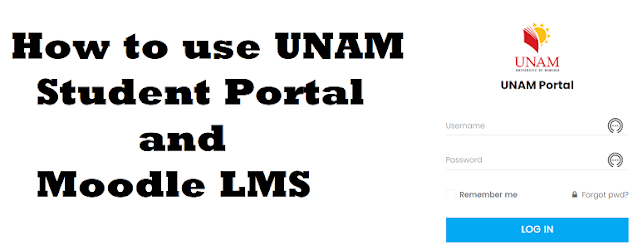
Unam portal is an online portal that enables current students to gain access to academic information as well as updates regarding the welfare, support and learning materials provisions.

UNAM Student Portal is the web front (like a gateway) to the University of Namibia’s programs and other learning-related materials. The students will have to have their user names and passwords to gain access to the portal. Therefore, all students must register and open an account before commencing studies at the university.


Find out how to login to UNAM Portal and access the UNAM iEnablers and other features that not many people know about, click here


How to register for 2023 UNAM Student Portal

If you are a prospective student, not registered at UNAM, you have to go through the following steps:

  • Apply, 
  • Register, 
  • Change personal information, 
  • Get academic and other information and 
  • Make payments.

When you have registered, you can use your username and password and login into the student portal. 

UNAM Courses, Requirements & Application for 2023

If you want to apply to study at UNAM, the best place to get the best and most reliable information is at the university's website. 

Based on past observations, the UNAM student application form 2023, both online and offline, has a due date is June of every year. 

UNAM evaluate applications and does the selection for 2023 based on Grade 12 August 2023 results or November 2023 results (if available). The Office of the Registrar will provide all provisional admitted students with correspondence including registration dates, tuition fees and orientation programmes, thereafter. 


--//--

UNAM Student helpful resources

Here are other helpful resources that you might find useful:
  • NAMCOL Student Portal Login Info
  • IOL Student Portal Login and Support Services
  • NSFAF Students Portal Login for Higher Institutions
--//--

Change Student Portal Password

For security reasons, you should change your password to a stronger password. Here is how to change your password.

Have your Cellphone number and email address ready.

  1. Visit this link by copy-and-paste into an Internet Browser.: www.office.com
  2. Enter your student email address. i.e. yourstudentnumber@students.unam.na
  3. Enter your UNAM student portal password, and click on Sign In.
  4. Follow the prompt & select NAMIBIA (+264) >Enter your cellphone number >Make sure that “Text me a code” is selected and click on NEXT.
  5. Enter the number sent to you by SMS and click NEXT >wait for the 'SUCCESS' message.
  6. Follow the prompt > CLICK on the X button to Exit
  7. Change Password: Enter your Old Password (the UNAM student portal one). Enter a New Password, and Confirm the new password.
That's it. You are set. Do not disclose your password to anyone!

Uses of UNAM Student Portal and Moodle LMS

It seems that there there is a misunderstanding about the uses (or purposes) of UNAM Student Portal and UNAM Moodle LMS. In fact, the online teaching and learning will be done through the Moodle Learning Platform, rather than the Student Portal.  

The university mentioned that as part of the remote Learning and Teaching strategy of the University, these two platforms (student portal and LMS Moodle) will complement each other.

UNAM MOODLE LMS 2023 (Learning Management System)

Moodle provides for effective student-centred learning through active interaction with fellow students, learning content or activities. 

Something that cannot be done to the same extent through the Student Portal.  It further provides opportunities for mobile learning through the Moodle Mobile app and assessment through the use of mobile devices. Please click on the following links:

  • To download the Moodle mobile app:  https://download.moodle.org/mobile/
  • More information/learning materials about the Moodle mobile app: https://docs.moodle.org/38/en/Moodle_app

Uses of UNAM LMS Moodle

Students and staff should use Moodle for the following:

  • Access to all registered modules
  • Access to all remote Learning and Teaching activities
  • Student-Lecturer interaction
  • Download learning materials for offline access
  • Collaborative learning
  • Instant feedback on online tests and other assessments

UNAM Student Portal - UNAM student application form 2023

Students and staff should continue to use the UNAM Portal for the following:

  • Proof of Registrations, Academic Records and Progress Reports
  • Inter-Account Transfers and Refunds
  • Financial Statements
  • University Notices
  • Lecturer notices to Students 
This information is provided to help the students from Namibia. It is compiled from university manuals, handbooks and online resources that are available to the general public.

How PNG Grade 11 Selections for 2026 Takes Place (THE SELECTION PROCESS)

2026 Grade 11 Selection for National High Schools and Secondary Schools in the country will be done online. The Grade 11 online selection follows an initiative of the National Department of Education.

This education blog reproduces the Education Secretary's circular in brief for parents, guardians and stakeholders (alike) to understand the  Grade 11 selection process. 

🔔Be the first to knowFollow PNG Insight and get the latest opportunities on education and development straight to your Gmail.

How Grade 11 Selection Takes Place

  • Measurement Services Division (MSD) will provide the final results for Grade 10 to the Information and Communication Division (ICD).
  • ICD will run the Grade 11 Selection.
  • General Education Services will coordinate the selection process with all the principals from secondary and national high schools.
  • Inspections and Standards Division (ISD) and Guidance and Counselling Division (GCD) will assist principals in the provinces. Principals are asked to enter and verify data in the provinces.

YOU CAN SEE THE EDUCATION SECRETARY'S CIRCULAR (PDF) ON GRADE 11 SELECTIONS VIA THE LINK >> CLICK HERE

how grade 11 selection takes place in png - national department of education png


Duration of 2026 Grade 11 Selections

The Department of Education expects the (actual) selection to be done in 2 - 3 days as it will be done online. 

However, the data entry is done in the provinces and the selection process will take two weeks.
  • Grade 11 selection - 2 weeks
  • Principals to start selecting students - in 2  weeks
  • The selection listing for Grade 11 to secondary and national high schools is expected to be released around mid-December.
Check out the National High School Ranking Here

Grade 11 Selections Cut-off

The selections for Grade 11 to national high schools and secondary schools will be based on the Education Board's National Standards Requirements.
  • National High Schools Selection: The school of excellence concept requires that Grade 10 students with Distinctions or Credits are selected for National High Schools. The eligible students are pre-selected based on their intention on the School Leavers Forms.
  • Secondary Schools Selection: Students with x7 Upper Passes or a percentile score of 77 points or higher to be selected for Grade 11

Grading, Subject Weighting and Results

Grade 10 students in the country study x7 subjects. Hence, the results are based on all the subjects taken by every student. 

Here is a screenshot of Information on Grading, Subject Weighting and Grade 11 selection results. 

Source: Education Secretary Circular (13/2020) - Click here to watch the video that explains all these.

2023 grade 11 selections for 2024 academic year - national department of education png
national department of education png

6 Factors for non-selection of students to Grade 11

  • Fail to apply
  • Bad Character 
  • Below School Quota
  • No School leavers form
  • Parents not requesting a transfer 
  • Gender equity in case of a tie in the selection
The Grade 11 selection for 2026 takes a new approach where principals and education offices do the selection in the provinces, instead of Port Moresby. 

This blog advocates for transparency in the selection of Grade 11 students. 

At the same time, we hope that the new Grade 11 online selection initiative of the NDoE is as effective and efficient and can deliver the results on time. 

Past Grade 11 Selections - Port Moresby

The Grade 11 selections used to take place in Port Moresby. Principals and education officers from the provinces gathered in the capital city for weeks on end to do the selection. 

It can take up to 2 weeks for them to select students for the national high and secondary schools.

The principals and education officers from the provinces work with MSD and GED (two divisions of the National Department of Education) to finalise the selections. 

The final selection listing would be given to the education secretary to sight and sign and made available on the Department of Education website. 

The principals also inform the newly selected Grade 11 students of their schools for the new academic year. 

This was the past where things were done manually. 

Data Entry and Verification

The principals and a provincial selection committee would meet in the provinces and do the 2026 Grade 11 selection. 

They then verify students' eligibility and enter their data online. (An important function, now done in the provinces) . Data verification and entry will take two (2) weeks. 

The Grade 11 selection is a mandatory function of the National Education Board (NEB). 

The selection of Grade 11 students is not a provincial function, it still remains a national function. This implies that the cleansing of data (if any) and final (quality) checks will be done by the NEB before the 2026 Grade 11 selection listing comes out to the public.

About PNG Insight

PNG Insight is an education blog. It aims to highlight the key developments in the education sector in Papua New Guinea. Started in 2014 on Google's blogger (now self-hosted on Wordpress), PNG Insight strives to be a platform for critical thinking and discussions; and a source of information.

Leave a comment and let us know about your visit. 

POST A COMMENT.

SEARCH THE ENTIRE SITE HERE

Public Holidays in PNG 2025

Public Holidays in PNG 2025
CLICK ON THE IMAGE TO GET THE LATEST INFORMATION